
BEHAVIOUR YOU MAY EXPERIENCE:
Your Micro-I does not turn on when you press the power button.
1. MICRO-I'S BATTERY CHARGE IS LOW
It may be that the Micro-I's battery's charge is too low to power up all the Micro-I's components.
Resolve the issue
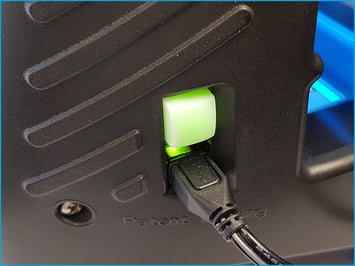
1. Turn off your Micro-I
- If your Micro-I is on (i.e. the power button is green), press the power button for three seconds to turn it off:
- the power button's backlight will turn off after flashing red
- your Micro-I's internal light will turn off after flashing amber.
2. Connect your Micro-I to external power
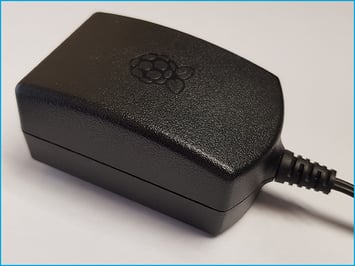
- Plug your Micro-I's power adapter into a wall socket and the other end (Micro-USB) into your Micro-I.
- Turn on the power at the wall socket.
3. Turn on your Micro-I
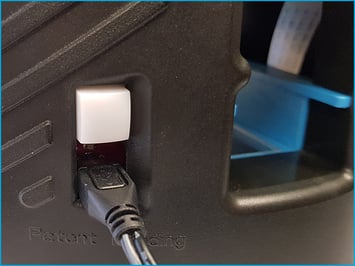
- Press the power button on your Micro-I for two seconds to turn it on:
- the power button's backlight will flash red and green before settling on green
- your Micro-I's internal light will glow yellow and flash white before settling on solid white when ready.
2. THE POWER BUTTON NOT HELD IN FOR AT LEAST TWO SECONDS
It may be that you did not press and hold the power button down for at least two seconds.
Resolve the issue
1. Turn on your Micro-I
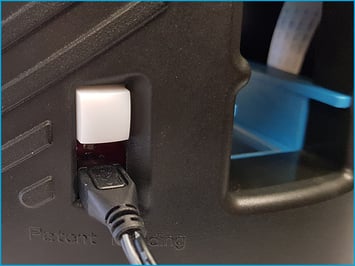
- Press the power button on your Micro-I for two seconds to turn it on:
- the power button's back-light will flash red and green before settling on green
- your Micro-I's internal light will glow yellow and flash white before settling on solid white when ready.
Help Centre
| Please follow a video tutorial on the recommended way to turn on your Micro-I at https://u.fecpakg2.com/hlp-fcpk-trnn. |
3. POWER AT THE WALL SOCKET IS TURNED OFF
If the previous solution did not resolve the issue, it may be that you did not turn on the power at the wall socket.
Resolve the issue
1. Connect your Micro-I to external power
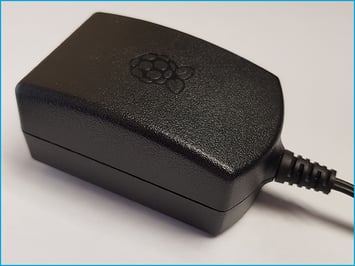
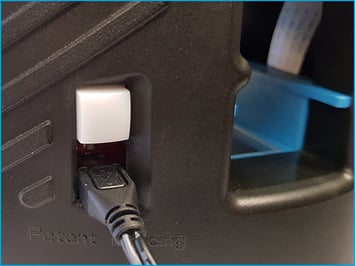
- Plug your Micro-I's power adapter into a wall socket and the other end (Micro-USB) into your Micro-I.
- Turn on the power at the wall socket.
2. Turn on your Micro-I
- Press the power button on your Micro-I for two seconds to turn it on:
- the power button's back-light will flash red and green before settling on green
- your Micro-I's internal light will glow yellow and flash white before settling on solid white when ready.
Help Centre
| Please follow a video tutorial on the recommended way to turn on your Micro-I at https://u.fecpakg2.com/hlp-fcpk-trnn. |
4. POWER ADAPTER IS INCOMPATIBLE OR FAULTY
If the previous solution did not resolve the issue, it may be that your Micro-I is using an incompatible power adapter, or the power adapter is faulty.
Resolve the issue
1. Inspect the equipment
- Remove the power adapter from the wall socket and the Micro-I in a safe manner.
- Inspect the power adapter and its cable for visible damage.
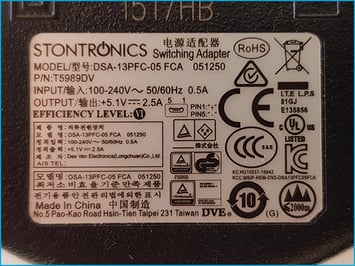
- Check the power adapter. The required capacity is:
- Output: 5.1V and 2.5A
- Input: 100-240V, 50/60Hz and 0.5A.
2. If the power adapter or its cable appears to be visibly damaged
- Do not use the damaged power adapter or cable any further.
- Please replace the power adapter.
3. If the power adapter does not meet the requirements
- Do not use the incompatible power adapter with your Micro-I any further.
- Please replace the power adapter.
4. Contact Techion Support
- Please contact Techion Support via https://u.fecpakg2.com/support, and provide:
- the serial number of your Micro-I (i.e. MX-MIC-XXXX-X-XXXXXXXXXX)
- your first and last names
- your email address
- your telephone number
- mention the make, model, output voltage, output ampere and condition of the power adapter and its cable.

6. For Techion Support